What's the risk?
A history keeps things you copied for a moment: passwords, customer details, private links. Anyone who can open your unlocked account, or any app running in it, may be able to read them. That's true of every clipboard app, and of Spotlight's history; Apple itself warns that sensitive information may appear there.
Seven things to check, and Stash's answers
| What to look for | Stash | |
|---|---|---|
| Where it's stored | Only on your computer, unless you turn on sync | On your Mac, in a folder private to your account. No sync between Macs |
| Encryption | Its own, or the disk's | No encryption of its own. Turn on FileVault |
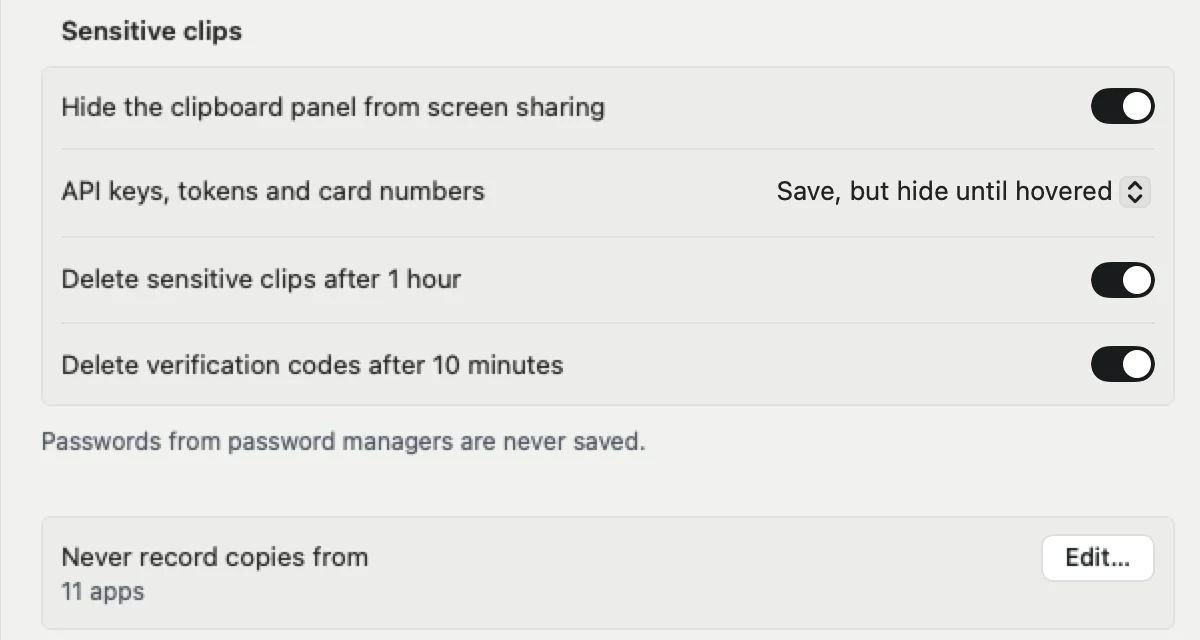
| Password managers | Skipped, and private markers respected | 11 skipped, plus anything marked private by the app you copied from |
| Other secrets | Hidden or removed | Those it recognises: hidden, gone after about an hour unless pinned or in a collection. It can miss one |
| Pause and delete | Easy, and kept after a restart | Pause, kept after a restart, and forget the last 5 to 60 minutes |
| Internet | Little, and explained | Update check, link previews (can be off), downloads you press |
| AI apps | Off until you connect one | Off until then. At first a connected app can read your whole history |
Habits that help more than any app
- Fill passwords with your password manager instead of copying them.
- Turn on FileVault, and lock the Mac when you leave.
- Pause history before client or medical work.
- Keep history for a week, not forever, if you don't need more.
- On a work Mac, ask IT first.
Questions
Can other apps read my clipboard anyway?
Many Mac apps can read the current copy. A history adds older ones, which is why where it's stored matters.
Is a clipboard manager a keylogger?
No: it keeps what you copy, not what you type. It's still worth checking which permissions it asks for.
Does a password manager's auto-clear help?
Yes, when the history respects its private marker. Most known managers mark their copies; a browser may not.